Buyer / consumer
DevCheck AI
Trust Score + AI analysis + IP reputation + shareable device certificate. For checking a phone before you pay for it. 7 MB.
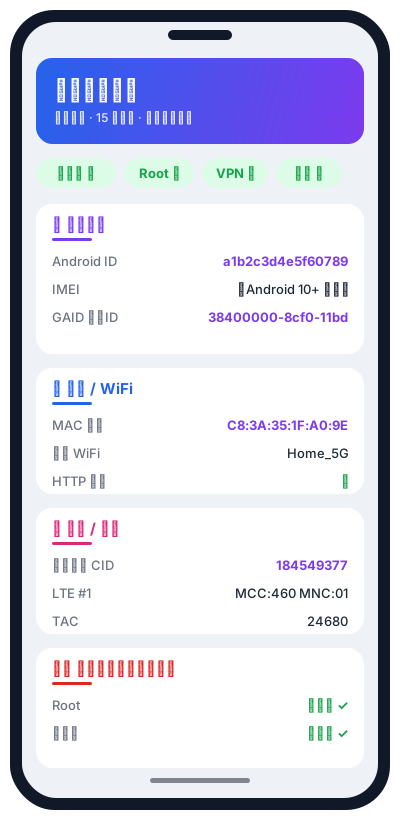
Features →DeviceInfo Viewer is a tiny read-only Android app. It reads what the OS will surface — 15 categories, from emulator / root detection through cell towers, sensors, GPU strings, install source — and lays it out flat. No analysis, no score. Every value long-press-copyable, so what you see is what you paste into your report.
Two apps, two audiences. They're written by the same team and share the same 84K-device reference database, but they exist for different jobs.
Trust Score + AI analysis + IP reputation + shareable device certificate. For checking a phone before you pay for it. 7 MB.
Features →Raw dump of everything Android will surface, laid out flat. No analysis, no score. For debugging, privacy audits, anti-fraud research. Tiny APK.
15 dimensions →Reads system state, doesn't modify it. Nothing to persist, nothing to break. You're inspecting your own phone, not changing it.
Pure Java + framework API. No native .so,
no third-party libs. Universal ABI, drops onto any device.
Same framework APIs any third-party app calls — so what you read here is what other apps read about your device.
Emulator / Root / VPN / debug status shown as coloured badges at the top of the screen. Green = clean, red = hit.
Fingerprint / getprop / /proc/cpuinfo / sensor list — every value is one long-press away from your clipboard.
Compat from API 21 through API 36. Fields locked down by newer Android are explicitly labelled (e.g. IMEI "restricted since Android 10").
Everything on one long scroll of cards. Each section collapses independently.
Emulator, Root (su / Magisk / test-keys), VPN, debug state
Android ID, IMEI/MEID, IMSI, serial, ICCID, phone number, GAID, DRM ID, UA
Brand / manufacturer / model, fingerprint, full Build + Build.VERSION
CPU model / cores / ABI, /proc/cpuinfo, frequency, NFC, system features
Full sensor inventory (name / vendor / type / version) — low count flagged red
System / data / external partitions, free / total memory
Level, charge counter, current, temperature, charging method
Carrier, IP, MAC, connected WiFi, WiFi scan list, proxy, Bluetooth address
Serving cell (GSM/CDMA), getAllCellInfo (GSM/CDMA/LTE neighbours)
SIM state, carrier, MCC / MNC, CarrierId
GPS state, lat/lng, country/language, timezone, boot time
Resolution, DPI, refresh rate, brightness
OpenGL vendor / version / extensions
Per-stream volume, image / audio counts, codecs
ADB debug, input method, install source, shared libs, Java properties
Every runtime permission below maps to a specific field on the panel. Deny any of them and the corresponding fields just show "not granted" — the rest of the app keeps working.
| READ_PHONE_STATE | Carrier, SIM, network type |
| ACCESS_FINE / COARSE_LOCATION | Cell towers, WiFi scan list, lat/lng |
| ACCESS_WIFI_STATE / ACCESS_NETWORK_STATE | WiFi + network state |
| BLUETOOTH_CONNECT | Bluetooth adapter name (one emulator signal) |
| READ_MEDIA_IMAGES / VIDEO (13+) or READ_EXTERNAL_STORAGE (≤12) | Count photos / audio files |
Strong identifiers (IMEI / IMSI / serial etc.) are locked down on Android 10+. Normal apps can't read them. The panel labels these fields as "restricted" honestly.
com.deviceinsight.deviceviewerVerify integrity after download:
shasum -a 256 deviceinfo-viewer-v1.1.apk
# should output the SHA-256 above, exactlyadb install deviceinfo-viewer-v1.1.apkCopy the APK to your phone, tap it, allow "install from unknown sources" if prompted.
That check is "is this app being debugged / built as debuggable" — nothing to do with your phone's USB debugging switch. A release build shows "no". For the phone-level USB debugging state, look under 🧩 System state → ADB debug.
Android 10 (API 29) blocked normal apps from reading those. It's a system-level restriction, not a Viewer bug. The panel labels these fields "(restricted since Android 10)".
The corresponding runtime permission wasn't approved. Viewer doesn't nag — it skips those fields and shows the rest.
Free. No account. Read the source truth of any Android you can install it on.